What is inside your download
The seven-page PDF is a starting point rather than a journal you have to complete from beginning to end. Pick the page that solves a small problem today. You can print selected page numbers in your PDF app and leave the rest for later.
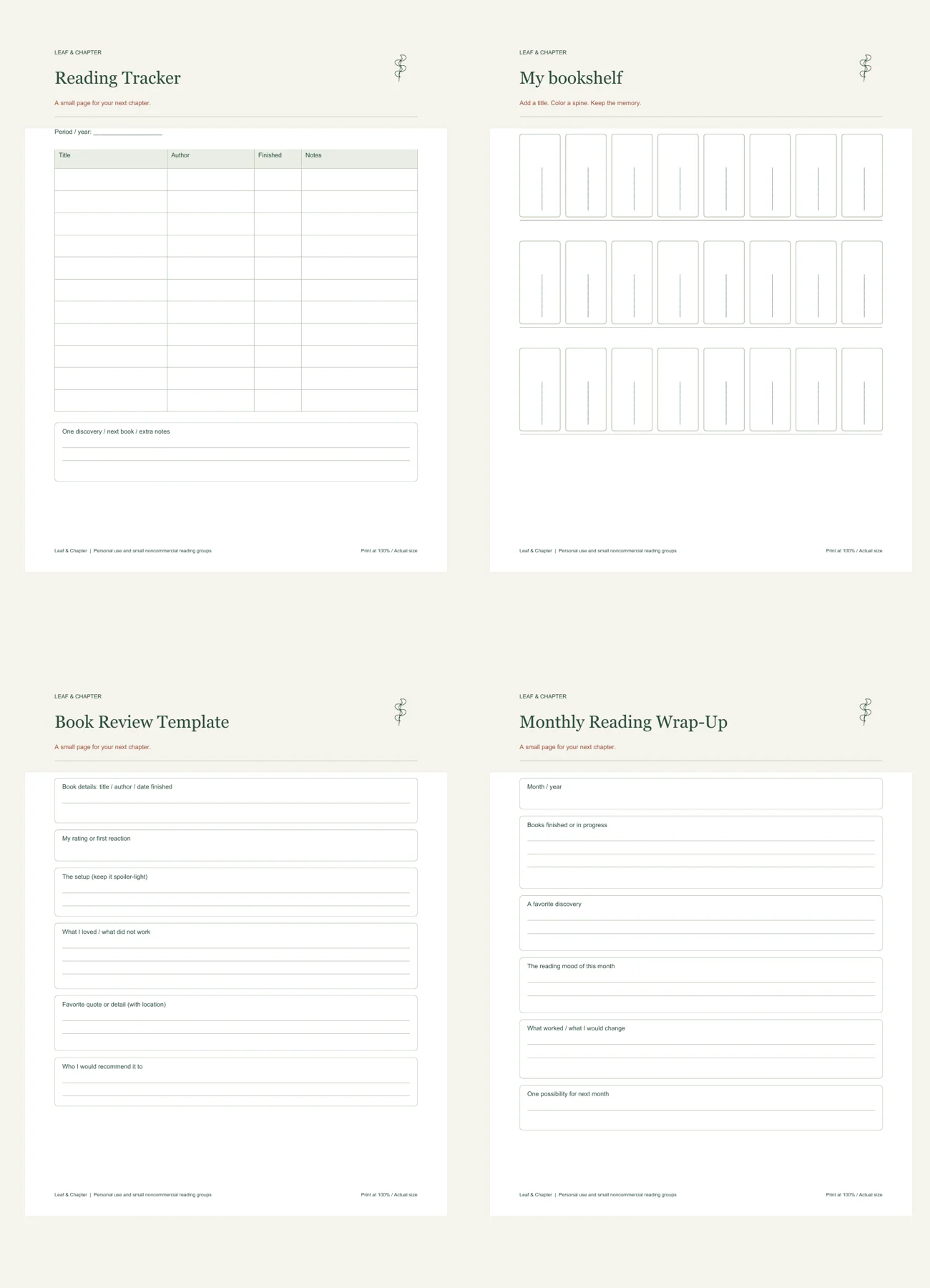
- Reading tracker. A table for titles, authors, finished dates, and a short note. Use it when you want one place to look back at your reading.
- Color-in bookshelf. Twenty-four empty book spines across three shelves. Add a title and color a spine after finishing a book. Leave a spine blank for a book still in progress.
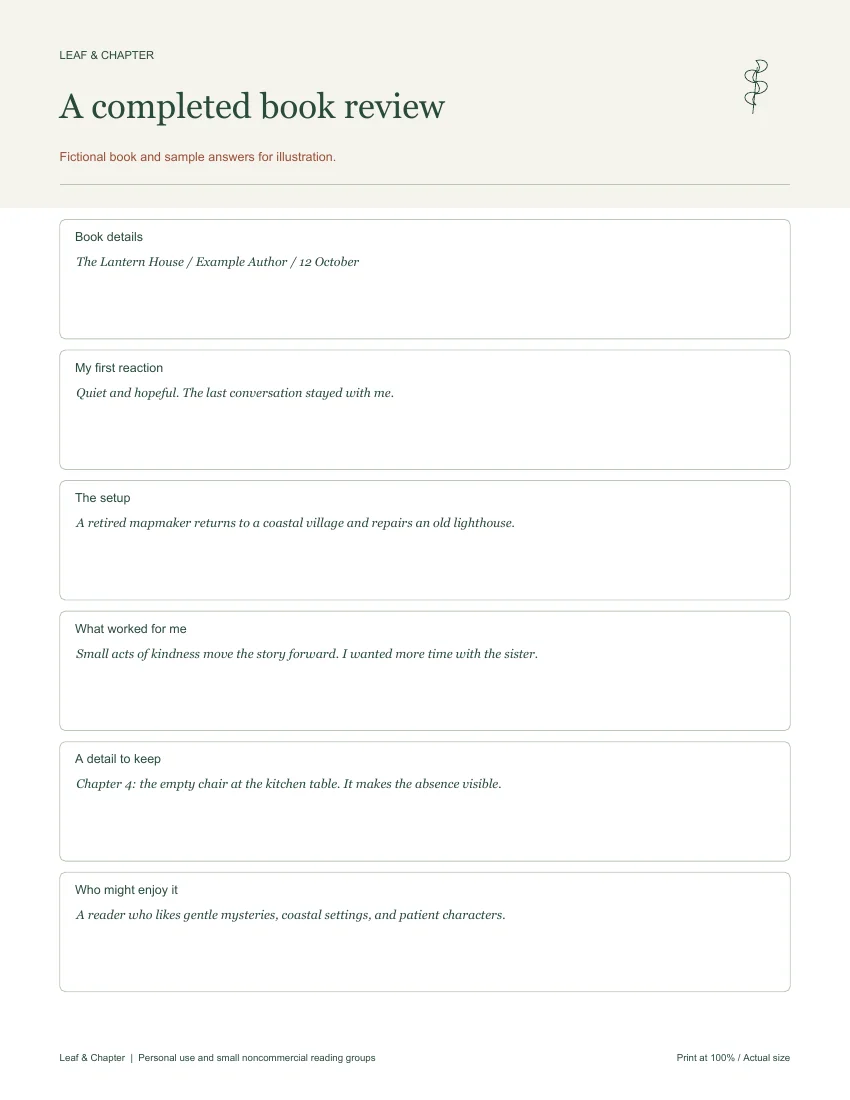
- Book review. Six labeled fields help you capture your first reaction, the setup, what worked, a detail to keep, and the reader you would recommend it to.
- To-be-read list. Record the title and author, why the book caught your attention, and where to find it. That last column can save another search through library holds.
- Monthly wrap-up. Notice your favorite discovery, reading mood, and what helped you make room for a book. A quiet month still belongs on the page.
- Botanical bookmarks. Four bookmarks to cut out and tuck into your current reads. The minimalist and ink-saving versions keep the same outlines with simpler decoration.
- Completed review example. Sample answers for a clearly labeled fictional book show how specific a short review can be. Use the example as a guide, then write in your own voice.
Start with a book you can still remember
Choose one recent read. Write its title in the tracker and add a few words about what stayed with you. “The kitchen-table conversation” will bring back more than “good book.” You can add an author and date now, or leave them until you have the book nearby.
Next, try the review sheet. Describe the setup in one or two sentences without revealing the ending. Name one scene, choice, or idea that made you respond. You do not need a polished review. You need a note that future you can recognize.
Keep the bookshelf nearby if a visual record makes you want to return to the journal. The twenty-four spines are spaces, not a reading target. Print another shelf when you need one, or let a single shelf hold a whole year.
Choose the version you will actually use
Botanical adds a soft heading band and delicate leaves. Minimalist keeps the layout clean, with neutral lines and little decoration. Ink-saving uses simple outlines and restrained headings for everyday copies. The writing prompts stay the same across all three.
US Letter suits 8.5 × 11-inch paper. A4 is 210 × 297 mm. A5 is 148 × 210 mm, with smaller fields that fit a compact journal. These are separate layouts for each paper size. Select the file that matches your paper and start with Actual size or 100% in the print dialog.
The kit is for printing and writing by hand. If you prefer typing, visit the individual book review, reading goals, or book-club notes pages for their separate fillable downloads.
Keep it easy to return to
A folder, clipboard, or a few protective sleeves is enough. Keep the current tracker at the front. Put review pages behind it as you finish them, and keep your reading list somewhere you can check before borrowing another book.
Print one test sheet before making a stack. Check the edges and writing space, then try a pen on the paper. For bookmarks, use paper your printer supports and cut one before cutting the rest. If you are punching holes, check the placement first or use sleeves to protect the writing areas.
At the end of a month, read one old note before adding a new one. That small pause is the point of keeping a journal: you get to meet a book again, through the detail you chose to save.
Your free reading journal starter kit
Choose the look you love and the paper you use. Every version has the same useful pages.
Botanical · US Letter · 7 pages · 557 KB
Download your PDF ↓These are print-and-write or print-and-cut pages. A5 has smaller writing spaces.
Undated PDF · Print at 100% / Actual size · Printing help · Personal-use license
A few useful answers
Do I have to sign up?
No. Choose a style and paper size, then download the PDF directly. You do not need an account or email address.
Can my book club use it?
Yes, personal use and small noncommercial reading groups are welcome. Share a link to this page rather than uploading or selling the files. See the personal-use license for details.